How to Use MetaTrader 5 (MT5): A Beginner's Guide
MetaTrader 5 (MT5) is the trading platform MetaQuotes developed after MT4; besides forex, it can be used for products such as stocks and futures, depending on the broker. Compared with MT4 it offers more timeframes, indicators and pending order types, supports hedging or netting accounts and uses the MQL5 language. You download it from your broker or from MetaQuotes and log in with the account details your broker provides.
Key takeaways
- MT5 is a trading platform developed by MetaQuotes; your account and money are held by the broker, not by the platform.
- Depending on the broker and account type, MT5 uses hedging (several positions per symbol) or netting (one combined position per symbol).
- According to MetaQuotes, MT5 has 21 timeframes, 38 built-in indicators, 44 analytical objects and 6 pending order types.
- According to MetaQuotes, the MT5 trailing stop runs in the platform rather than on the server, so it stops moving while the platform is closed.
- Expert Advisors and indicators written for MT4 do not run in MT5 without being rewritten; MT5 uses the MQL5 language.
At a glance
- Timeframes
- 21 (Oct 2026)
- Pending order types
- 6 (Oct 2026)
- Position accounting
- Hedging or netting
- Built-in indicators
- 38 (Oct 2026)
What is MetaTrader 5 used for?
MetaTrader 5 (MT5) is the trading platform MetaQuotes developed after MT4. Brokers connect it to their own servers and offer it to their clients. With MT5 you can:
- follow prices in forex and, depending on the broker, in products such as stocks, indices and futures,
- analyse markets with charts and indicators,
- place market orders and six types of pending order,
- see a built-in economic calendar and, for some products, market depth,
- run and test automated trading programs called Expert Advisors (EAs), written in the MQL5 language.
MT5 is only software: your account and your money are held by the broker, not by the platform. A firm offering MT5 is not evidence that it is regulated or reliable.
How do you download and install MT5?
- Download: get the platform from your broker’s website or from MetaQuotes’ official MT5 download page; the mobile apps are on the App Store and Google Play. Installers from unofficial sites may contain malware.
- Choose a version: MetaQuotes offers a desktop version for Windows and macOS, apps for iOS and Android and a web platform that runs in the browser. On Linux, use typically requires a compatibility layer or a broker-specific installation method rather than a standard native installer.
- Log in: use the account number, password and server name from your broker.
- Demo account: a demo account can be used to learn the platform without risking real money: forex demo account.
Can you log in to MT5 with an MT4 account?
Usually not. MT4 and MT5 accounts run on separate servers, so an MT4 account cannot be used to log in to MT5 and a separate MT5 account is usually opened with the broker.
MT5 hedging vs netting: what is the difference?
MT5 accounts use one of two position accounting systems; which one applies depends on the broker and the account type:
- Netting: only one combined position is kept per symbol. A trade in the opposite direction reduces, closes or reverses the existing position.
- Hedging: several independent positions on the same symbol, including opposite ones, can be open at the same time. Each new trade opens a separate position.
Hedging vs netting in MT5
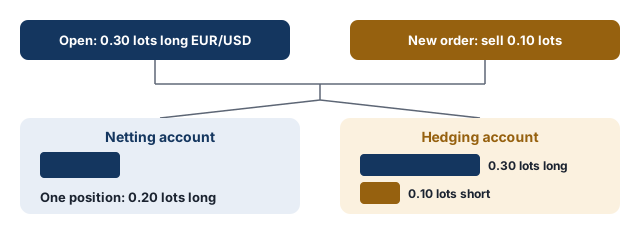
You hold a 0.30-lot long position on EUR/USD and place a 0.10-lot sell order.
- Netting account: the position becomes 0.20 lots long.
- Hedging account: two separate positions stay open, 0.30 lots long and 0.10 lots short.
Holding opposite positions on the same symbol (hedging) can still incur spread, commission and overnight financing costs, depending on the broker and account type.
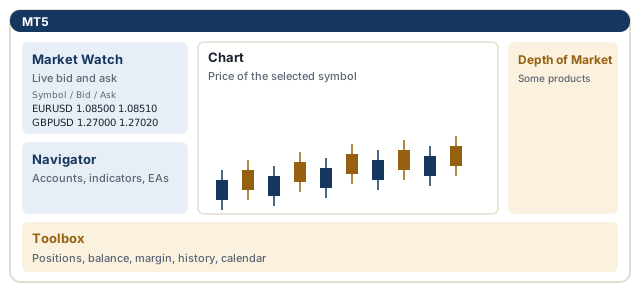
MT5 interface: main windows and panels
| Window | What it shows |
|---|---|
| Market Watch | Live bid and ask prices of the symbols |
| Navigator | Accounts, indicators, Expert Advisors and scripts |
| Chart | The price chart of the selected symbol |
| Toolbox | Open positions, balance, equity, margin, account history and the economic calendar |
| Depth of Market | Buy and sell orders at different price levels, for products where the broker provides it |
What balance, equity and margin mean: what is margin in forex.
How do you open a trade in MT5?
- Double-click a symbol in Market Watch or press F9 to open the New Order window.
- Choose the symbol and enter the position size in lots in the Volume field: what is a lot in forex.
- Optionally enter Stop Loss and Take Profit levels.
- For a market order, click Buy or Sell.
How to open a short position in MT5
MT5 short trade example: EUR/USD
You want to sell 0.10 lots of EUR/USD. The bid, the price you can sell at, is 1.08500.
- Volume: 0.10
- Stop Loss: 1.08800 (30 pips above)
- Take Profit: 1.07900 (60 pips below)
- When you click Sell, the position opens at the current bid or, depending on the broker’s execution model and market conditions, a nearby price.
On 0.10 lots of EUR/USD on a USD account a pip is worth about $1, so the loss is about $30 if the stop is hit and the gain about $60 if the target is reached, before costs.
A short position is closed by buying back at the ask, so on short positions the stop loss and take profit are triggered by the ask: bid and ask, long and short positions.
What are the MT5 order execution modes?
MT5 has four execution modes; which one applies depends on the broker and the product:
- Instant execution: the order is filled at the price shown on screen if possible; if the price has changed, the broker can offer a new price, a requote.
- Request execution: a price is requested from the broker first; if the quoted price is accepted within a short time, the trade opens at that price.
- Market execution: generally does not use requotes; the order is filled at the available market price and may slip in fast markets: slippage.
- Exchange execution: for exchange-traded products, the order is passed to the exchange and filled there.
What pending order types does MT5 have?
Pending orders are chosen in the Type field. Besides the four pending orders MT4 has, MT5 adds two stop limit orders:
| Order | Used to |
|---|---|
| Buy Limit | buy below the current price |
| Sell Limit | sell above the current price |
| Buy Stop | buy once the price rises above a level |
| Sell Stop | sell once the price falls below a level |
| Buy Stop Limit | place a Buy Limit at a lower price once the price rises to a stop level |
| Sell Stop Limit | place a Sell Limit at a higher price once the price falls to a stop level |
Order types with worked examples: forex order types.
What are Buy Stop Limit and Sell Stop Limit orders?
Buy Stop Limit and Sell Stop Limit are two-stage pending orders, MT5’s versions of the stop-limit order. You set a stop price and a limit price; when the price reaches the stop level, the platform places a limit order at the limit price.
Buy Stop Limit example
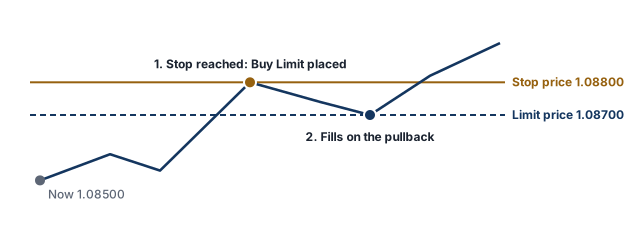
EUR/USD is at 1.08500. You expect that if the price breaks above 1.08800 the rise will continue, but only after a short pullback.
- Buy Stop Limit: stop price 1.08800, limit price 1.08700
- When the price reaches 1.08800, a Buy Limit order is placed at 1.08700.
- If the price pulls back to 1.08700, the order is filled; if it keeps rising without a pullback, it is not filled.
Because a stop limit order creates a limit order rather than a market order when triggered, it may never be filled if the price does not come back to the limit level: stop-limit orders.
MT5 stop loss, take profit and trailing stop
How to add or modify stop loss and take profit in MT5
To add or change the levels on an open position, right-click it in the Trade tab of the Toolbox window, choose Modify or Delete, enter the levels and confirm: stop loss, take profit.
How to use a trailing stop in MT5
In the desktop platform, right-click the position, open the Trailing Stop menu and choose a distance. The trailing stop moves the stop loss behind the price at a fixed distance as the trade moves in your favour: trailing stop. Availability of the trailing stop in the mobile apps may differ by app and version.
Does the MT5 trailing stop work when the platform is closed?
No. According to MetaQuotes, the MT5 trailing stop runs in the trading platform rather than on the server, unlike the stop loss and take profit themselves. While the platform is closed or offline the stop is not moved; the last stop level it reached is stored on the server and remains in force.
How do you use charts and indicators in MT5?
MT5 timeframes
MT5 has 21 timeframes: M1, M2, M3, M4, M5, M6, M10, M12, M15, M20 and M30 (minutes); H1, H2, H3, H4, H6, H8 and H12 (hours); and D1 (day), W1 (week) and MN1 (month).
What indicators does MT5 have?
According to MetaQuotes’ platform page (as of October 2026), MT5 includes 38 built-in technical indicators, such as moving averages, RSI, MACD, Bollinger Bands and the stochastic oscillator, and 44 analytical objects such as trend lines and Fibonacci tools. These figures can change with platform updates. Indicators are added by dragging them from the Navigator window onto a chart.
Where is the MT5 economic calendar and how is it used?
The MT5 economic calendar is the Calendar tab of the Toolbox window. It shows major macroeconomic releases by country and can be filtered by country and importance. It shows in advance when important data is due; around those times spreads can widen and prices can move quickly: spread.
How do Expert Advisors work in MT5?
An Expert Advisor is a program written in the MQL5 language that can trade automatically according to its rules. EAs and indicators written in MQL4 for MT4 do not run in MT5 directly; they have to be rewritten, or an MT5 version has to be used. MT5’s Strategy Tester can run an EA’s rules on historical data, but past test results do not guarantee future results. EAs sold with promises such as “guaranteed profits” may be warning signs of forex scams.
MT5 vs MT4: which should you use?
Being newer does not make MT5 automatically better for everyone. MT5 offers more timeframes, order types and, depending on the broker, products; MT4 may remain relevant where existing workflows depend on MQL4 tools or where a broker only supports MT4. How MT4 works: how to use MetaTrader 4. A detailed comparison: MT4 vs MT5.
Free email course
Forex Risk Management in 5 Days
A free five-day email course: risk per trade, stop losses, position sizing, risk-reward and drawdowns, with a worked example each day.
Frequently asked questions
Does MT5 allow hedging?
It depends on the account mode the broker sets. A hedging account allows several positions, including opposite ones, in the same symbol; a netting account combines them into one net position.
How do I place a pending order in MT5?
Open a New Order window, change the type from Market Execution to Pending Order, choose one of the six types (Buy Limit, Sell Limit, Buy Stop, Sell Stop, Buy Stop Limit, Sell Stop Limit), enter the price and, if needed, the stop loss and take profit.
Is MT5 better than MT4?
Neither is better in every case. MT5 has more timeframes, indicators and order types and supports exchange-traded products; MT4 is simpler and some existing tools only run on it. A comparison: [MT4 vs MT5](/wiki/mt4-vs-mt5).
Is MT5 free?
Brokers usually provide the platform free of charge; the main costs are trading costs such as spreads, commissions and swaps, although some brokers charge for extras such as data feeds or hosting.
Can I log in to MT5 with my MT4 account?
Usually not; a separate MT5 account is normally needed.
Can MT5 be used in other languages?
Yes. The MT5 interface is available in many languages and can be changed from the View menu.
Sources
- MetaTrader 5 Trading Platform, MetaQuotes
- MetaTrader 5 Help: General Principles of Trading, MetaQuotes
- Download MetaTrader 5, MetaQuotes
Related articles
- How to Use MetaTrader 4 (MT4): A Beginner's Guide
How to install and use MetaTrader 4 (MT4): logging in, opening trades, pending orders, stop loss and take profit, trailing stops, charts and Expert Advisors.
- Forex Order Types: Market, Limit, Stop and More Explained
Forex order types explained: market order, buy limit vs buy stop, sell limit vs sell stop, stop-limit, stop loss, take profit, trailing stop, OCO and GTC.
- Forex Demo Account: What It Is and How to Use It Properly
What is a forex demo account? How demo trading works, how to use a demo account properly, demo vs live differences and when to move to a live account.
- Stop Loss in Forex: How to Set One and Where to Place It
How a stop loss works in forex, how to set one step by step, common ways to choose the stop level, and why a stop can close at a worse price.
Glossary terms
- Hedging
Hedging is reducing the currency risk of a position or an asset with an opposite position; on forex platforms the term also describes holding opposite positions on the same pair at the same time.
- Expert Advisor
An Expert Advisor (EA) is a program for MetaTrader that can analyse prices and open, manage and close trades automatically according to rules written in MQL4 or MQL5.
- MQL4 and MQL5
MQL4 and MQL5 (MetaQuotes Language) are the programming languages MetaQuotes developed for MetaTrader 4 and MetaTrader 5, used to write Expert Advisors, custom indicators and scripts.
- Requote
A requote happens when the price changes before an order is filled and the broker, instead of filling it at the requested price, offers a new price that the trader can accept or reject.
- Market execution
Market execution is an order execution model in which orders are filled at the best price available when they reach the broker, rather than at a fixed price requested by the trader.
- Trailing stop
A trailing stop is a stop loss that moves with the price as a trade goes in your favour. It keeps a set distance from the price and does not move back.
- Slippage
Slippage is the difference between the price you expect when placing an order and the price at which it is actually filled. It can work against you (negative slippage) or in your favour (positive slippage).
- Take profit
A take profit is an order that closes a position automatically when the price reaches a set profit target.
- Stop loss
A stop loss is an order that closes a position automatically if the price moves against you to a set level. It is designed to limit the loss on a trade, but it does not guarantee the exit price.
First published 1 October 2026. Last fact-checked 4 October 2026.This article is for educational purposes only and is not investment advice.