MT4 vs MT5: Differences and Which to Use
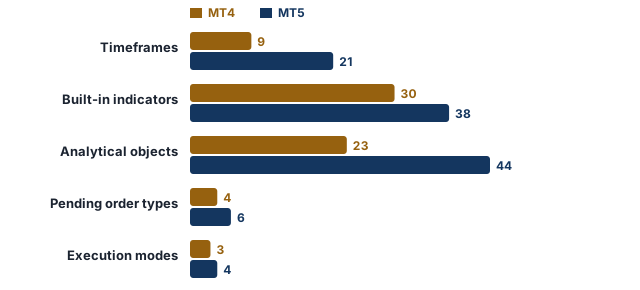
The main difference between MT4 and MT5 is scope: MT5 offers 21 timeframes, 38 built-in indicators, 6 pending order types, hedging or netting accounts, a built-in economic calendar and support for exchange-traded products, while MT4 is a simpler forex-focused platform with 9 timeframes, 30 indicators and 4 pending order types. Both are MetaQuotes products; which suits you depends on your broker, the products you trade and the EAs you use.
Key takeaways
- MT4 and MT5 are two separate MetaQuotes platforms; MT5 is not an updated version of MT4.
- MT5 offers more timeframes, indicators and order types; MT4 is simpler.
- Expert Advisors and indicators written in MQL4 for MT4 generally need an MT5 version or rewriting to run in MT5.
- Cost differences usually come from the broker's account configuration and pricing rather than from the platform software.
- Being newer does not make MT5 automatically better for everyone.
At a glance
- MT4 (Oct 2026)
- 9 timeframes, 4 pending orders
- MT5 (Oct 2026)
- 21 timeframes, 6 pending orders
- Custom EAs and indicators
- Need MT5 (MQL5) versions
- Accounts
- Usually separate
What are the differences between MT4 and MT5?
MetaTrader 4 (MT4) and MetaTrader 5 (MT5) are two separate trading platforms from the software company MetaQuotes. MT5 is not an updated version of MT4 but a different program: accounts are separate, and Expert Advisors and indicators generally require compatible MT5 versions or rewriting. According to MetaQuotes’ platform pages (as of October 2026), the main differences are:
| Feature | MT4 | MT5 |
|---|---|---|
| Timeframes | 9 | 21 |
| Built-in technical indicators | 30 | 38 |
| Analytical objects | 23 | 44 |
| Pending order types | 4 | 6 (including Buy Stop Limit and Sell Stop Limit) |
| Order execution modes | 3 (instant, request, market) | 4 (including exchange execution) |
| Position accounting | Multiple independent positions per symbol | Hedging or netting, depending on the account |
| Programming language | MQL4 | MQL5 |
| Built-in economic calendar | No | Yes |
| Depth of Market | Not a core standard feature | Yes, for supported products |
| Product scope | Commonly used for forex and CFDs | Broader infrastructure that also supports exchange-traded products |
These figures can change with platform updates, and the products actually available on either platform depend on the broker. How each platform works: how to use MT4, how to use MT5. For EAs and the languages they are written in, see Expert Advisor and MQL4 and MQL5.
How do pending order types differ between MT4 and MT5?
The four basic pending orders (Buy Limit, Sell Limit, Buy Stop, Sell Stop) exist on both platforms. MT5 adds Buy Stop Limit and Sell Stop Limit orders, which place a limit order once the price reaches a stop level. How stop-limit orders work in general: stop-limit orders.
MT4 vs MT5: hedging and netting differences
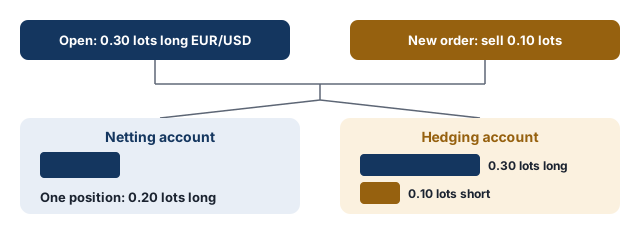
In MT4, several independent positions on the same symbol, including opposite ones, can be open at once (hedging). In MT5 this depends on the account: hedging accounts work like MT4, while netting accounts keep one combined position per symbol, so an opposite trade reduces or closes the existing one: hedging vs netting.
Is MT5 better than MT4?
Being newer and offering more features does not make MT5 automatically better for everyone. For core tasks such as opening trades, placing stops and reading charts, workflows are broadly similar. The difference shows when the extra features are needed.
MT4 or MT5 for beginners?
Both platforms can be used by beginners; opening trades, adding stops and reading charts work almost identically. For beginners, broker regulation and trading conditions are separate considerations from platform choice. On either platform, a demo account can be used to practise without risking real money.
When might MT4 be more suitable?
- When an EA or indicator you rely on exists only for MT4 (MQL4).
- When your workflow does not require MT5-specific features such as extra timeframes, stop-limit orders or netting.
- When your broker offers only MT4.
When might MT5 be more suitable?
- When you want more timeframes, more indicators or stop-limit orders.
- When you want the economic calendar and Depth of Market inside the platform.
- When you also want to trade exchange-traded products your broker offers on MT5.
- When you prefer netting accounts, where the broker offers them, or want to develop EAs in MQL5.
Do MT4 Expert Advisors work on MT5?
Not directly. MT4’s MQL4 and MT5’s MQL5 are different but related languages with different execution environments (MQL4 and MQL5); an Expert Advisor or indicator written for MT4 has to be rewritten in MQL5, or the developer’s MT5 version has to be used. On either platform, past test results do not guarantee future profitability.
What should you check when moving from MT4 to MT5?
- Separate account: an MT4 account usually cannot be used to log in to MT5, so a separate MT5 account is needed.
- Account type: check whether the MT5 account uses hedging or netting, which matters if you hold several positions on the same symbol.
- EAs and indicators: check whether MT5 versions of the EAs and custom indicators you use exist.
- Conditions: even at the same broker, MT4 and MT5 accounts can have different spreads, commissions and product lists, so compare the fee schedules.
- Demo account: the new platform can be tried on a demo account before real money is used.
Are trading costs different on MT4 and MT5?
Even at the same broker, MT4 and MT5 accounts can have different spread, commission and swap conditions. Differences usually come from the broker’s account configuration and pricing rather than from the platform software itself. Costs are therefore compared between a broker’s accounts rather than between platforms: spread.
Free email course
Forex Risk Management in 5 Days
A free five-day email course: risk per trade, stop losses, position sizing, risk-reward and drawdowns, with a worked example each day.
Frequently asked questions
Can I use the same account on MT4 and MT5?
Usually not. MT4 and MT5 accounts run on separate servers, so a separate MT5 account is normally opened with the broker.
Do MT4 indicators work on MT5?
Built-in indicators exist on both. Custom indicators and Expert Advisors written in MQL4 do not run on MT5 without a version written in MQL5.
Which is better for forex, MT4 or MT5?
Both are used for forex trading. MT5 adds more timeframes, order types, a built-in economic calendar and a choice of hedging or netting; MT4 is simpler. The choice often depends on the broker's account types and the tools a trader already uses.
Is MT4 or MT5 better for beginners?
Either can be used; core workflows are broadly similar, and the broker's platform offering often decides.
Can you hedge in MT5?
Yes, if the account uses the hedging system; on netting accounts only one combined position per symbol is kept.
Are spreads different on MT4 and MT5?
Differences usually come from the broker's account configuration and pricing rather than from the platform software itself.
Sources
- MetaTrader 4 Trading Platform, MetaQuotes
- MetaTrader 5 Trading Platform, MetaQuotes
- MetaTrader 5 Help: General Principles of Trading, MetaQuotes
Related articles
- How to Use MetaTrader 4 (MT4): A Beginner's Guide
How to install and use MetaTrader 4 (MT4): logging in, opening trades, pending orders, stop loss and take profit, trailing stops, charts and Expert Advisors.
- How to Use MetaTrader 5 (MT5): A Beginner's Guide
How to install and use MetaTrader 5 (MT5): hedging and netting accounts, opening trades, six pending order types, stop limit orders, trailing stops and EAs.
- Forex Order Types: Market, Limit, Stop and More Explained
Forex order types explained: market order, buy limit vs buy stop, sell limit vs sell stop, stop-limit, stop loss, take profit, trailing stop, OCO and GTC.
- Forex Demo Account: What It Is and How to Use It Properly
What is a forex demo account? How demo trading works, how to use a demo account properly, demo vs live differences and when to move to a live account.
Glossary terms
- Hedging
Hedging is reducing the currency risk of a position or an asset with an opposite position; on forex platforms the term also describes holding opposite positions on the same pair at the same time.
- MQL4 and MQL5
MQL4 and MQL5 (MetaQuotes Language) are the programming languages MetaQuotes developed for MetaTrader 4 and MetaTrader 5, used to write Expert Advisors, custom indicators and scripts.
- Expert Advisor
An Expert Advisor (EA) is a program for MetaTrader that can analyse prices and open, manage and close trades automatically according to rules written in MQL4 or MQL5.
First published 1 October 2026. Last fact-checked 4 October 2026.This article is for educational purposes only and is not investment advice.